

The Click Tax: 65% of Your Trial Users Quit Before Your Product Does Anything Useful
 Mickey Alon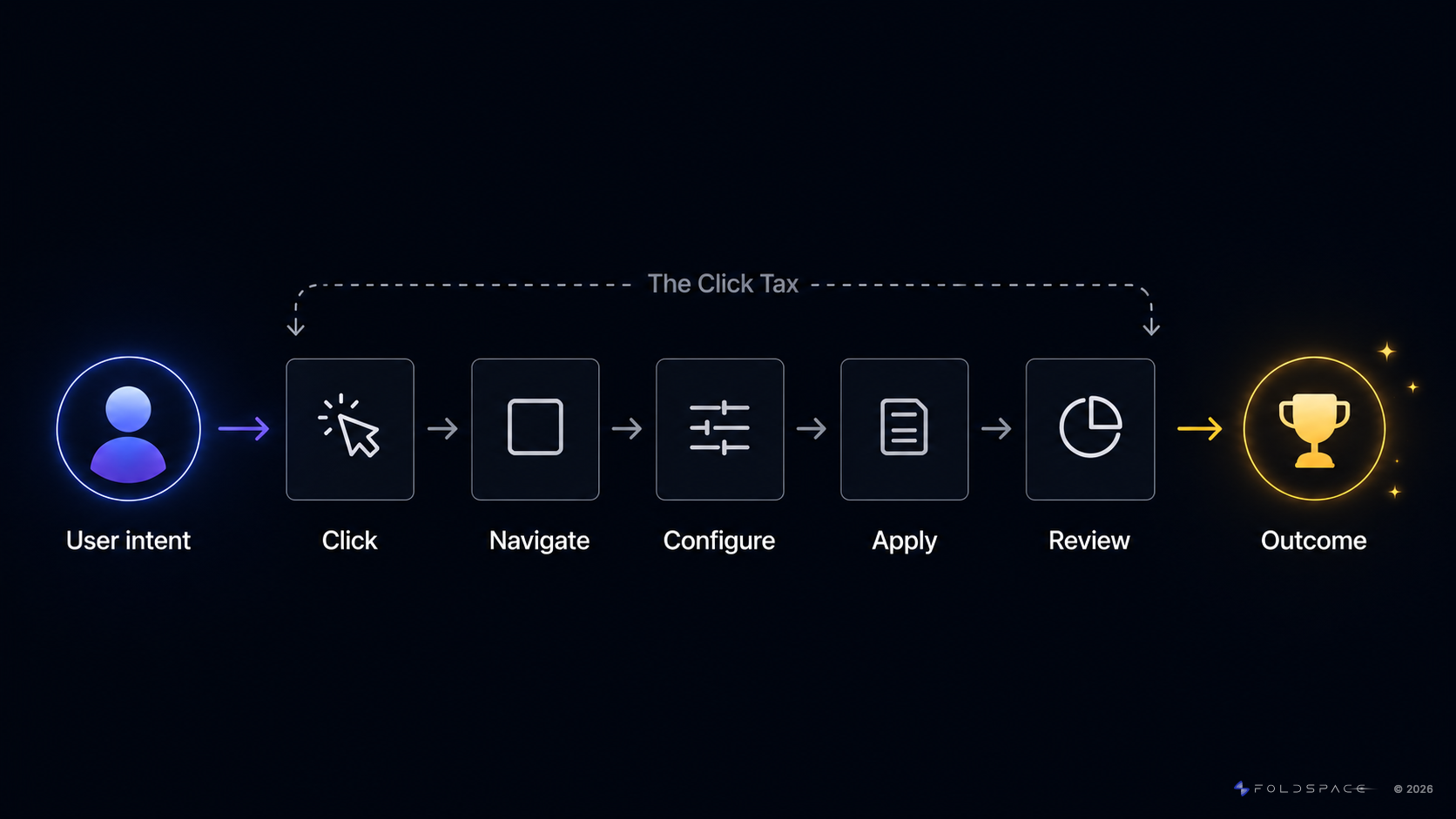
Your product is losing users before they ever experience why they signed up.
Not because of bad UX. Not because of buggy code. Not because of a weak value proposition.
Because of the click tax.
The click tax isn't about the number of clicks. It's the cognitive burden your product forces on every new user. The time and mental energy spent figuring out how to set up, configure, and operate your system instead of doing the thing they came to do. The value they signed up for is buried under menus, settings, and workflows they have to learn before the product delivers anything useful.
The average B2B SaaS onboarding flow takes 7 steps and over 15 minutes before a user completes their first meaningful action. That's 15 minutes of learning your product instead of getting outcomes from it. A 10-step activation path where each step has a 90% completion rate delivers only 35% of users to the end. The math compounds against you. Every step is a user choosing between figuring out your UI and closing the tab.
Most teams aren't measuring this directly. They see the drop-off in their funnel. They attribute it to messaging, or positioning, or feature gaps. The click tax is the mechanism underneath. The usual fixes don't work because they try to make the learning curve more bearable instead of eliminating the learning requirement entirely.
Not by making it smaller. By making it disappear.
What Is the Click Tax?
The click tax is the cumulative cognitive cost of every moment a user spends learning your product instead of getting value from it.
It's not about the number of clicks. It's about what each click demands. Every interaction in your onboarding flow asks the user to do cognitive work: figure out where to go, understand what a setting does, decide how to configure something they don't yet understand, and trust that the choice they're making is the right one for their use case.
That work adds up fast.
- The user who has to navigate three menus deep before starting their first project isn't paying a navigation tax. They're paying an understanding tax. They don't know why those menus exist or which options matter.
- The form that asks for configuration details in session one is asking the user to make expert-level decisions before they have beginner-level context.
- The 7-step onboarding checklist isn't guiding the user toward value. It's front-loading the entire learning curve before the product does anything useful.
Every one of these moments is a deduction. Not from a click count. From the user's willingness to keep going.
The compounding effect
A small percentage of users who were going to reach the aha moment don't make it because of that step. The compounding effect is brutal: a 10-step activation path where each step has a 90% completion rate delivers only 35% of users to the end. Add one more step and you're at 31%.
The click tax is what stands between your user's intent and their outcome. They came to do something. Your product is making them learn something first.
The Blank Screen Problem
The click tax gets worse at the exact moment your product should be delivering value.
A user finishes your signup flow. They land in the product for the first time. And they're looking at an empty workspace. Nothing is configured. Nothing is populated. The product is waiting for them to build something. But they don't know enough about the product yet to know what "build" even means.
This is the blank screen problem. The user has cleared the navigation hurdles, made it through the setup steps, and arrived at the place where value is supposed to happen. Instead they're staring at a canvas with no paint, no brushes, and no idea what the finished painting should look like.
The cognitive load here is different from the click tax in the onboarding flow. In the flow, the user is making decisions they shouldn't have to make. At the blank screen, they don't even know what decisions are available. They don't know which settings matter. They don't know which integrations to connect first. They don't know what a good baseline configuration looks like for their use case. They don't know what "done" looks like.
The Checklist & Walkthrough Trap
The standard response to the blank screen is to layer guidance on top of it. Setup checklists. Product tours. Onboarding wizards. Tooltips on every field. Help centers. Chatbots.
The SaaS industry has spent a decade and billions of dollars building these tools. They feel like solutions. They're not. They're the complexity itself, repackaged.
We didn't remove the complexity. We just dumped it onto the user. We gave them tooltips instead of solutions. We gave them tours instead of outcomes. We created a click tax that kills conversion rates.
A checklist doesn't eliminate the 12 decisions a user has to make during setup. It puts those 12 decisions in a numbered list and calls it progress. A product tour doesn't remove the cognitive load of understanding your system. It narrates the cognitive load in sequential popups that 60-80% of users dismiss before step three. A tooltip that explains what a field does is not a substitute for a product that fills the field for you. A help center serves the 12% of users motivated enough to search for answers. The other 88% file a ticket or leave. Usually they leave.
Even chatbots, the closest attempt at solving the real problem, stop short in a critical way. A chatbot can tell you what to do. It cannot do it for you. The user asks "how do I connect my Salesforce integration?" and gets instructions. They still have to find the settings menu, locate the integrations section, click through the OAuth flow, and configure the field mapping. The chatbot reduced the search friction. The click tax still applies to every step that follows.
The user's job hasn't changed with any of these tools. They still have to analyze, decide, configure, and build from scratch. The only thing that changed is that now there's a green progress bar telling them how far they still have to go.
They're laying bricks when they came to live in the house.
Every one of these tools shares the same assumption: that the path between signup and value is fixed, and the best you can do is make it easier to walk.
That assumption is wrong.
The path shouldn't be easier to walk. It should be shorter. Or it shouldn't exist at all. The user said what they want. The product should do it.
Guidance tools treat the product as a destination the user needs help reaching. Users treat the product as a means to an outcome they want now. That gap is why every guidance-based approach hits a ceiling. You can't tour your way out of a fundamentally broken model.
The Compounding Effect
The two problems feed each other. The click tax drains the user's motivation on the way in. The blank screen kills it when they arrive. The walkthrough trap makes it worse by giving the user the illusion of help while preserving the full cognitive burden. A 15-minute onboarding flow where the user is confused for 12 of those minutes is worse than all three problems alone. You're not just charging the tax. You're asking users to do the product's job for it.
Product-led growth solved the access problem. It removed sales gates and let users try before they buy. But PLG left the outcomes problem untouched. It gave users the keys and showed them a map. Then it dropped them in an empty parking lot and said "build the road."
What the Click Tax Is Actually Costing You
The click tax doesn't show up as a line item in your metrics dashboard. It shows up as underperformance in every metric that matters.
Trial-to-Paid Conversion
The industry benchmark for B2B SaaS trial-to-paid conversion is 15-25%. Top-performing PLG products hit 30-40%. That gap compounds at scale: at 1,000 trials per month and a $10,000 ACV, the difference between 20% and 30% conversion is $1M in new ARR every single month. Over a year, that's $12M left on the table. Not from new spend. From users who already showed up.
Most of that gap lives in session one. Users who don't reach a meaningful outcome in their first session rarely come back. The click tax determines how many of them make it. Not your feature set. Not your pricing page. The cognitive cost of getting from signup to the aha moment.
Support Volume
Every ambiguous step in your activation path generates support tickets at a predictable rate. The user who can't figure out how to connect their CRM doesn't read your help article. They file a ticket. Or they leave. Usually they leave.
Reducing the click tax doesn't reduce support volume incrementally. It removes the friction that generates the tickets in the first place. The cheapest support ticket is the one that never gets created because the user never got stuck.
Churn Before It Starts
The aha moment is the single most predictive leading indicator of long-term retention. Users who experience your product's core value in session one retain at dramatically higher rates than users who don't.
The click tax is the mechanism that prevents users from getting there. Every minute spent learning your product instead of experiencing it is a minute closer to the user deciding this isn't worth their time. Churn doesn't start at renewal. It starts in the first fifteen minutes.
CAC Efficiency
Every dollar you spend acquiring a trial user is a bet that the user converts. A high click tax means a large portion of that bet never pays off. The users are there. They signed up. They had intent. Your product's cognitive burden burned through that intent before it could become activation.
Fixing the click tax is one of the highest-return moves available to a growth team because it doesn't require spending more on acquisition. It improves the return on every dollar already being spent. Same traffic. Same trials. More revenue.
How AI Operators Eliminate the Click Tax
The click tax has resisted every solution that tried to make the path easier to navigate. The only approach that eliminates it is removing the path entirely.
That's what an AI Operator does.
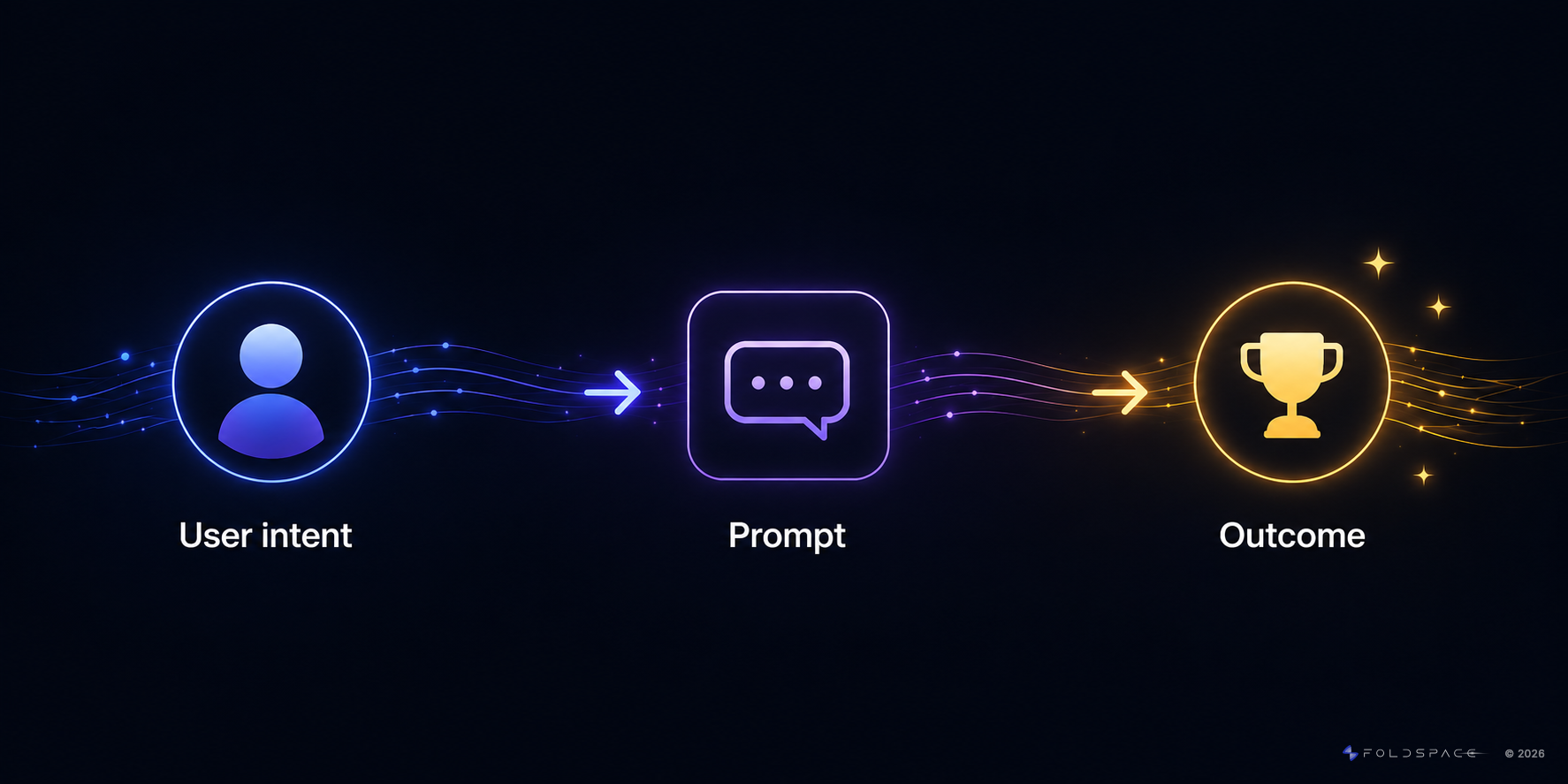
Instead of pointing a user at a 7-step workflow, an AI Operator understands what the user wants in plain language and executes the workflow on their behalf. The user says "set up my workspace" or "connect my Salesforce integration" and the agent navigates, clicks, fills forms, configures settings, and completes the action. The user watches it happen or simply sees the result.
No tour. No tooltip. No help article. No steps.
The AI doesn't just point. It does.
Generate, Don't Onboard
The traditional approach assumes every new user needs to be onboarded. Taught how the product works. Walked through the setup. Guided to the right configuration. The entire model is built around getting the user to a point where they can operate the product themselves.
An AI Operator skips that model entirely.
Instead of onboarding the user to the product, the product generates the outcome. The user describes what they need. The agent builds it. A configured workspace. The right defaults for their use case. Populated data. Initial assets ready to go. The user doesn't learn how to set things up. They get the setup, delivered.
This is the generative experience. The product's first interaction with a new user isn't a tour or a checklist. It's a result.
The difference is fundamental. Onboarding asks the user to invest time before they receive value. The generative approach delivers value before the user invests anything. The user's first experience of the product isn't learning. It's seeing their outcome already built.
The 80% is done. The user adjusts the last 20% if they want to. Most of the time, the generated baseline is close enough that they start working immediately. No blank screen. No cognitive load. No click tax.
Every product team knows the difference between staring at a blank page and reviewing a first draft. One is paralyzing. The other is productive. The generative approach gives every new user a first draft of their workspace, their configuration, their workflow. They never see the blank screen at all.
The Category Shift
This is a fundamentally different model from every previous onboarding approach:
- Product tours show users where to click. The user still has to click, configure, decide, and build.
- Tooltips explain what a field means. The user still has to understand, decide, fill, and validate.
- Help centers provide written instructions. The user still has to find, read, follow, and execute.
- Chatbots answer questions about how. The user still has to navigate, click, configure, and verify.
- AI Operators generate the outcome. The user only has to review the result.
Chatbots answer questions. AI Operators take action.
Product tours show users where to click. AI Operators click for them.
Digital adoption platforms overlay guidance on top of the UI. AI Operators replace the need for that guidance entirely.
Onboarding wizards walk users through configuration. AI Operators generate the configuration and let users refine it.
The shift is from guidance to execution. From onboarding users to generating outcomes. From click tax to zero tax.
The Data
The activation metrics reflect the shift. Benchmark data from ProductLed's 2025 research on AI-Native onboarding shows the gap:
- Freemium, self-serve: 3-5% is good, 6-8% is great — agentic onboarding reaches 25-30%.
- Free trial: 8-12% is good, 15-25% is great — agentic onboarding reaches 25-30%.
That's a 5-8x lift for freemium self-serve products. The mechanism is direct: eliminate the click tax and the blank screen simultaneously, and users who previously dropped off before experiencing value now complete activation in their first session.
Foldspace, an AI Operator platform for SaaS products, benchmarks the impact across its customer base: onboarding paths that previously required 7 steps and 15+ minutes now complete in 3 steps and under 60 seconds. One customer measured a 344% increase in daily AI-driven activations after deploying the AI Operator.
The click tax doesn't get smaller. It gets eliminated.
How to Audit Your Own Click Tax
Before you can eliminate the click tax, you have to see it. Most teams have never mapped the full cognitive cost of their activation path. Once you do, you can't unsee it.
clicktax.ai is a free tool built for this. Walk through your product's activation path and get a quantified click tax score in minutes. If you want to do it manually, here's the process.
Step 1: Define Your Activation Milestones
What are the key moments that signal a user has experienced your product's core value? Not account creation. Not tutorial completion. The moments where the product does something meaningful for them.
In B2B, this is rarely a single event. Different roles activate differently. An admin who connects an integration has a different aha moment than an end user who runs their first report. Map the primary activation path for your highest-volume user persona first.
Examples:
- A project management tool: first project created with tasks assigned to teammates
- A CRM: first pipeline view populated from imported contacts
- A data tool: first report generated from live data
- A marketing platform: first campaign launched with audience segments configured
Everything between signup and these milestones is click tax.
Step 2: Map Every Decision
Walk through your product as a first-time user. Start from the email confirmation and end at the activation milestone. But don't count clicks. Count decisions.
Write down every point where the user has to:
- Understand something before they can proceed
- Choose between options they don't have context to evaluate
- Configure a setting they don't know the impact of
- Figure out where to go next because the path isn't obvious
- Translate what they want into the product's language
Count them. Most teams expect 5 or 6. The real number is usually north of 15.
Step 3: Find the Drop-Off Cliff
Use your product analytics to identify which step in the activation path has the highest drop-off rate. This is your click tax peak. The point where the cognitive cost is concentrated enough to lose the most users.
Look for the pattern: the drop-off cliff is almost always a step where the user has to make a decision they're not equipped to make. Not a step where they have to click a button. A step where they have to know something they don't know yet.
Step 4: Calculate the Revenue Impact
The math is straightforward:
- Monthly trials × current activation rate = current monthly conversions
- Monthly trials × target activation rate = potential monthly conversions
- Difference × ACV = monthly revenue gap
- × 12 = annual revenue left on the table
For most mid-market SaaS products, a 5-10 percentage point improvement in activation rate translates to hundreds of thousands to millions of dollars in additional ARR annually.
The click tax is not a UX problem. It's a revenue problem.
Step 5: Ask What the Product Could Generate
For every decision on your map, ask two questions:
- Does the user need to make this decision, or could the product make it for them?
- Could the product generate a ready-to-use result instead of asking the user to build one from scratch?
The first question identifies decisions to eliminate. The second question identifies entire workflows to replace with a generative experience.
Think about what your product could hand to a new user in their first 60 seconds. A pre-configured workspace based on their role and use case. A populated dashboard with sample data that mirrors their industry. A draft campaign built from the information they provided during signup. A first report generated from the integration they just connected.
The user who receives a generated starting point doesn't face a blank screen. They don't make 15 decisions. They review what the product built and adjust what needs adjusting. The click tax for that entire path drops to near zero.
Every workflow where the answer to question two is "yes" is a candidate for an AI Operator. Not a better tooltip. Not a shorter checklist. An agent that generates the outcome before the user has to ask.
Measure your click tax at clicktax.ai.
Foldspace is the AI Operator for SaaS products — an embedded agent that understands user intent and executes it, compressing onboarding from 15 minutes to under 60 seconds. No product rewrite required.